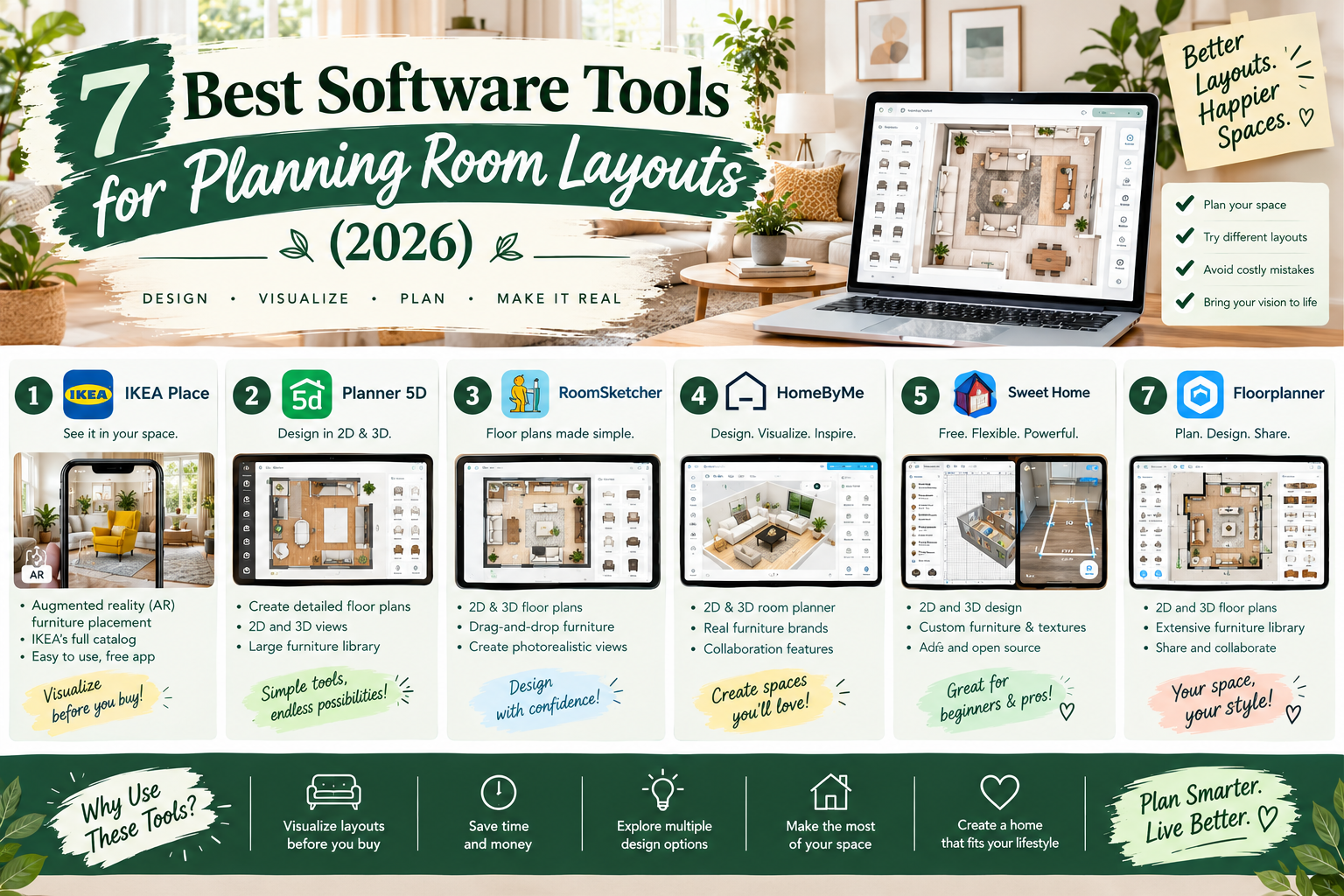
Choosing the right software for planning room layouts can save time, reduce furniture-buying mistakes, and help you visualize how a room will look before making expensive changes.
Whether you're rearranging a small bedroom, furnishing an apartment, designing a living room, or planning a home office, a digital room planner allows you to experiment with layouts without physically moving heavy furniture.
Many tools offer free access to basic floor planning, furniture placement, and 3D visualization. However, not every free plan includes high-resolution downloads, realistic renders, or unlimited access to furniture libraries.
Quick answer: Floorplanner is a practical choice for detailed room layouts, Planner 5D offers approachable 2D and 3D room design, Sweet Home 3D is suitable for people who prefer downloadable software, and IKEA Kreativ is especially useful for visualizing IKEA furniture in an existing room. RoomSketcher, Homestyler, and Roomstyler are also worth considering depending on your needs.
This guide compares seven room planning tools, explains their free features and limitations, and shows you how to create an accurate furniture layout from scratch.
What Is Room Layout Planning Software?
Room layout planning software helps you draw a floor plan and arrange furniture inside a virtual room.
Instead of relying on imagination, you can enter room dimensions, add doors and windows, and position furniture to scale.
Many applications also offer a three-dimensional view that helps you understand how the arrangement might feel from different angles.
What Can a Room Layout Planner Do?
Depending on the software, you may be able to:
Draw walls using actual measurements.
Add doors, windows, and architectural features.
Place sofas, beds, tables, and other furniture.
Resize or rotate furniture.
Compare several arrangements.
View the room in 2D or 3D.
Test different finishes and colors.
Save or export floor plans.
Share design ideas with others.
Some applications also include AI-assisted room visualization or tools that convert existing floor plans into editable designs.
These additional capabilities often depend on a paid plan or purchased credits.
Best Software for Planning Room Layouts: Quick Comparison
| Software | Best For | Free Access | Main Limitation |
|---|---|---|---|
| Floorplanner | Detailed room layouts | Up to 5 free projects | Watermarked standard-definition exports |
| Planner 5D | Beginners wanting 2D and 3D | Unlimited free projects | Restricted furniture catalog and advanced tools |
| Sweet Home 3D | Downloadable floor planning | Free open-source application | Requires learning the interface |
| RoomSketcher | Floor plans and room measurements | Free starter access | Many finished floor-plan outputs cost credits |
| Homestyler | Furniture styling and 3D concepts | Free basic access | Higher-end assets and renders may require payment |
| IKEA Kreativ | Visualizing IKEA furniture | Free design experience | Primarily focused on IKEA products |
| Roomstyler | Casual furniture-layout inspiration | Online room-design tool | Verify current capabilities and access before relying on it |
Free-plan terms and features can change. The limitations above reflect available provider information reviewed in October 2026, and not all applications were independently hands-on tested for this article.
1. Floorplanner — Best for Detailed Room Layout Planning
Website: https://floorplanner.com/
Floorplanner is an online design application for creating two-dimensional floor plans and viewing them in three dimensions.
It provides tools to draw rooms, establish wall dimensions, place doors and windows, and arrange furniture.
For homeowners who want to know whether a sofa, dining table, or bed will fit comfortably, this type of dimension-based planning is particularly useful.
Key Features
Floorplanner supports room drawing, furniture placement, multiple design layouts, and 3D visualization.
You can use it to experiment with alternative furniture configurations without redrawing the entire room.
For example, you might compare a sectional sofa against a standard sofa and two chairs before ordering furniture.
Is Floorplanner Free?
Floorplanner's official pricing page states that casual users can create up to five free projects.
Free projects are subject to limitations, including a maximum of three floors, three designs in total per project, and standard-definition image exports with a watermark.
Higher-quality exports and additional functionality use credits or paid plans.
Pros
Useful for dimension-based layouts.
Offers both 2D and 3D perspectives.
Helps compare furniture arrangements.
Accessible through a browser.
Free access is sufficient for some basic home projects.
Cons
High-resolution output requires an upgrade.
The interface has more features to learn than a very simple drag-and-drop planner.
Free projects have limits.
Best for: Homeowners planning a living room, bedroom, apartment, or another space where accurate furniture placement matters.
2. Planner 5D — Best for Beginner-Friendly 2D and 3D Design
Website: https://planner5d.com/
Planner 5D combines floor-plan creation with interior visualization.
You can create a room layout, add furnishings, and view the design in two or three dimensions.
The software is particularly appealing to beginners who want to experiment with both furniture placement and decorating.
Key Features
Planner 5D supports project creation across web and mobile platforms.
Users can arrange furniture, build room layouts, and explore design alternatives.
More advanced subscriptions introduce expanded product libraries, realistic rendering, floor-plan recognition, and professional capabilities.
Is Planner 5D Free?
According to its official pricing page, the Free plan allows unlimited project creation and sharing.
The free tier also provides access to approximately half of its furniture catalog.
The full catalog, certain AI tools, realistic renders, and professional exports are associated with paid offerings.
Pros
Accessible for beginners.
Combines 2D planning with 3D visualization.
Allows unlimited free projects under the current published plan.
Works across supported web and mobile devices.
Useful for experimenting with color and furniture placement.
Cons
Some furniture and rendering options are paid.
Advanced features may require additional purchases.
Visualizing a design does not guarantee that every product matches real furniture dimensions.
Best for: Beginners who want to create room designs and compare arrangements visually.
3. Sweet Home 3D — Best Free Downloadable Room Planning Software
Website: https://www.sweethome3d.com/
Sweet Home 3D is a free, open-source interior design application that allows users to draw floor plans and furnish rooms.
It is a strong option for people who prefer a desktop-oriented workflow over a subscription-based planning service.
The program supports 2D plans and 3D room visualization.
Key Features
Sweet Home 3D lets users draw walls, place openings, arrange furniture, and explore room layouts in 3D.
Its official website offers downloadable and online options.
The software also supports additional furniture models and textures, although availability differs across distributions and associated resources.
Is Sweet Home 3D Free?
Yes. The official project identifies Sweet Home 3D as a free, open-source application.
Some distribution channels, additional assets, or packaged versions may have separate terms or charges.
Check the official download page before installing.
Pros
Free open-source software.
Supports detailed 2D planning.
Includes 3D visualization.
Can be used without relying entirely on a browser-based subscription.
Suitable for users who want more control over their projects.
Cons
The interface may require some practice.
Beginners seeking a very simple photo-based experience may prefer another tool.
Rendering and complex models can demand more computer resources.
Best for: Homeowners, students, and DIY designers who want reusable floor-planning software without a mandatory subscription for core functionality.
4. RoomSketcher — Best for Floor Plans and Furniture Measurements
Website: https://www.roomsketcher.com/
RoomSketcher is designed for drawing room plans, positioning furniture, and producing floor-plan visuals.
It can be useful for homeowners, interior design enthusiasts, and people who need a more structured floor-planning workflow.
Key Features
You can draw walls, add doors and windows, and position furniture within a floor plan.
RoomSketcher also offers snapshots, floor-plan outputs, and various 3D presentation features.
The available capabilities depend on the account and purchased outputs.
Is RoomSketcher Free?
RoomSketcher offers a free starter plan.
Its published free offering includes the ability to begin planning projects and preview spaces, with limited access to various features.
Official pricing and support pages explain that generating certain finished 2D and 3D floor plans requires credits or in-app purchases.
Therefore, it is more accurate to describe RoomSketcher as free to start, rather than promising unlimited free floor-plan exports.
Pros
Useful floor-planning interface.
Supports measured room designs.
Furniture and material tools.
3D previews.
Appropriate for more structured home layouts.
Cons
Certain outputs require payment.
Free access is limited compared with paid subscriptions.
Users should understand the credit system before purchasing exports.
Best for: People who want a measured floor plan and may be willing to pay for finished visual outputs.
5. Homestyler — Best for Interior Styling and 3D Visualization
Website: https://www.homestyler.com/
Homestyler combines room layout planning with furniture styling and interior visualization.
It is useful when you want to think about how furniture will fit and how different materials or decorating styles will look together.
Key Features
Homestyler includes digital floor-planning and interior design tools.
It offers furniture placement and 3D visualization, with a broader collection of visualization and rendering capabilities available across its service offerings.
Is Homestyler Free?
Homestyler offers access to basic design capabilities, while additional assets, rendering capacity, and advanced features may depend on paid plans.
Because subscriptions and feature entitlements can change, consult the current pricing page before planning a project around a particular export or rendering feature.
Pros
Combines space planning and styling.
Allows visual experimentation.
Supports interior design concepts.
Useful for furniture and finish combinations.
Cons
Advanced visualization features can involve charges.
Extensive libraries may encourage users to focus on appearance before checking dimensions.
The full interface can take time to learn.
Best for: Homeowners who want to explore decorating concepts alongside furniture layouts.
6. IKEA Kreativ — Best for Visualizing IKEA Furniture in Your Room
Website: https://www.ikea.com/us/en/home-design/
IKEA Kreativ is a free room visualization tool designed around IKEA furniture and home products.
It offers a different approach from a conventional floor planner.
Instead of creating everything from a blank floor plan, you can explore how furniture could look in an existing space.
Key Features
IKEA describes three ways to use Kreativ.
You can upload or photograph a room and experiment with furniture placement.
You can create a room using the web-based room builder.
You can also explore existing virtual room designs and replace their furniture with alternatives.
Certain scanning capabilities depend on compatible mobile hardware.
Is IKEA Kreativ Free?
IKEA identifies Kreativ as a free virtual room-design experience.
However, its product selection is naturally centered on IKEA's catalog.
Its official guidance also identifies categories that are not currently supported in the main Kreativ experience, including certain textiles and ceiling-mounted products.
Pros
Free virtual room-design experience.
Useful for testing IKEA furniture combinations.
Can work from an image of your room.
Offers inspiration layouts.
Helps connect design ideas with actual products.
Cons
Focuses primarily on IKEA products.
Not a complete substitute for technical space planning.
Some features differ by device or region.
Product availability varies by market.
Best for: People planning to purchase IKEA furniture or visualize new furnishings in an existing room.
7. Roomstyler — Best for Casual Room Design Inspiration
Website: https://roomstyler.com/
Roomstyler has historically been used for arranging furniture in virtual rooms and generating visual design concepts.
It is included in the competitor's review as an approachable option for beginners.
Key Features
The competitor describes tools for drawing room boundaries, placing windows and doors, adding furniture, and creating 3D room images.
Its interface emphasizes visual exploration rather than advanced technical drafting.
Is Roomstyler Free?
Roomstyler has offered free online room-design capabilities.
However, its current live feature availability, account restrictions, and export terms could not be independently confirmed to the same standard as the other providers in this comparison.
Check the live service before choosing it as your primary planning tool.
Pros
Historically beginner-oriented.
Focuses on furnishing and visual layouts.
Suitable for exploring basic room concepts when available.
Cons
Current free features need verification.
Specialized measurements and exports may be limited.
Not the strongest choice for a project requiring technical documentation.
Best for: Casual design inspiration, provided the current tool remains accessible and meets your requirements.
Which Room Layout Software Should You Choose?
The right application depends on your project.
| Your Goal | Recommended Starting Point |
|---|---|
| Create accurate furniture layouts | Floorplanner |
| Design a room in 2D and 3D | Planner 5D |
| Use free downloadable software | Sweet Home 3D |
| Create structured floor plans | RoomSketcher |
| Experiment with interior styles | Homestyler |
| Preview IKEA furniture | IKEA Kreativ |
| Explore basic visual layouts | Roomstyler, subject to current availability |
If you only need to determine whether your sofa fits beside a doorway, you may not need photorealistic rendering.
If you're planning an entire room makeover, 3D visualization can help you better understand the design.
How to Plan a Room Layout Using Free Software
Room-planning applications vary, but the basic workflow is similar.
Step 1: Measure the Room
Use a tape measure or other appropriate measuring tool to record the room's length and width.
Measure the ceiling height if your design includes tall storage or furniture.
Record the dimensions of doors and windows.
Also note radiators, electrical outlets, fixed cabinetry, and other features that affect furniture placement.
Step 2: Draw the Walls
Open your chosen room layout planner.
Select the relevant units, such as feet and inches or meters.
Create the room outline using your measurements.
Avoid relying entirely on a visual approximation.
Small measurement errors can matter when positioning furniture near doors or narrow passages.
Step 3: Add Doors and Windows
Position all doors and windows before arranging furniture.
Consider which direction each door swings.
A sofa or storage unit that looks suitable in an empty floor plan may obstruct an opening.
Step 4: Insert Your Largest Furniture
Start with the largest pieces.
For a living room, this might be a sofa.
For a bedroom, begin with the bed.
For a home office, place the desk first.
Use your furniture's actual measurements whenever the software permits.
Step 5: Add Smaller Furniture
Arrange side tables, chairs, cabinets, and other supporting pieces.
Check that drawers and cupboard doors can open.
Avoid adding furniture merely because the virtual room appears empty.
Step 6: Check Walking Space
Look at the clear routes between doors, furniture and room features.
As a general residential planning starting point, around 30–36 inches of clearance may be useful for main circulation routes, when the space permits.
Actual accessibility and building requirements can differ.
Step 7: Compare Two or Three Layouts
Create alternate furniture arrangements.
For example, you might compare a sofa facing the television with a conversation-oriented seating layout.
Consider which arrangement best supports your everyday activities.
Step 8: Preview the Room in 3D
If your software supports it, switch to the 3D view.
Check whether furniture proportions and placement look comfortable.
Remember that a rendering is only as accurate as the dimensions entered.
Step 9: Save and Review the Layout
Save your project using the options available in your plan.
If an export costs money, decide whether you actually need the downloadable file.
You may be able to continue editing the plan without purchasing advanced outputs.
Step 10: Verify Measurements Before Buying
Before ordering large furniture, check its real dimensions.
Confirm that it will fit through doorways, stairs, corridors, and elevators.
Never rely solely on a software-generated rendering for a major purchase.
2D vs. 3D Room Planning Software
Both 2D and 3D planning are useful, but they solve different problems.
| Feature | 2D Planning | 3D Planning |
|---|---|---|
| View | Overhead floor plan | Perspective or virtual room |
| Main purpose | Layout and measurement | Visual appearance and spatial perception |
| Furniture spacing | Easy to assess | Useful for visual confirmation |
| Decorating preview | Limited | More detailed |
| Learning curve | Often simpler | Varies by software |
| Best first step | Yes | After basic layout |
For most beginners, I recommend creating an accurate 2D floor plan before spending time on 3D finishes and decorative details.
Best Room Planner for Different Spaces
Living Room Layout Planning
Start with the sofa, chairs, television, windows, and main walking routes.
Use the floor plan to test different seating arrangements.
Check whether side tables and coffee tables leave sufficient clearance.
Bedroom Layout Planning
Begin with bed placement.
Then add bedside tables, wardrobes, desks, and dressers.
Check wardrobe doors and drawer access.
For small bedrooms, make sure the room remains comfortable to move through.
Small Apartment Layout Planning
Use accurate furniture dimensions.
Consider multifunctional pieces such as sofa beds, storage benches, and compact desks.
Experiment with zoning to separate living, sleeping, and work areas where necessary.
Home Office Layout Planning
Start with the desk and chair.
Consider windows, glare, lighting, storage and power access.
A successful office layout must support comfortable working conditions.
Kitchen Layout Planning
Room planners can help explore cabinet positions and general circulation.
However, kitchen design requires additional technical considerations involving plumbing, electricity, ventilation, appliances, and safety.
Use specialist kitchen-planning tools or qualified professionals for final technical decisions.
Can AI Software Design My Room From a Photo?
Some modern interior design tools allow you to upload a photograph and visualize different furniture or decoration arrangements.
IKEA Kreativ, for example, supports photo-based room exploration with compatible workflows.
Other platforms offer AI-assisted floor-plan recognition or image rendering through selected plans.
However, there is an important difference between AI room styling and accurate floor planning.
An AI-generated image may look realistic while changing the room's proportions, windows, door positions, or furniture dimensions.
For deciding whether actual furniture fits, dimension-based layout software is generally more dependable.
For exploring color and decorating styles, photo-based visualization can be helpful.
Free vs. Paid Room Planning Software: What Matters?
A free application may be enough for one small room.
Paid features become more important when you need professional outputs, complex projects, or high-quality visuals.
Before upgrading, check:
Whether the free plan allows the number of projects you need.
Whether furniture dimensions can be edited.
Whether 3D visualization is included.
Whether exports are watermarked.
Whether saving and sharing are free.
Whether printing to scale is supported.
Whether furniture catalogs are restricted.
Whether credits expire or renew.
Whether commercial use is allowed under the license.
Do not choose a subscription solely because the application offers attractive rendered images.
For a practical home project, accurate dimensions and useful editing tools are often more valuable.
Common Room Planning Mistakes to Avoid
Not Measuring the Room Properly
Small inaccuracies may lead to furniture that does not fit.
Forgetting Door Swings
Doors need clearance to open without hitting furniture.
Using Incorrect Furniture Dimensions
A generic virtual sofa may be smaller than the actual sofa you intend to purchase.
Ignoring Circulation
A room can look balanced on screen but still feel difficult to move through.
Choosing Furniture Before Planning
Create the layout before committing to expensive purchases.
Treating AI Images as Accurate Plans
AI-generated interiors can be useful for inspiration but are not automatically dimensionally reliable.
Overlooking Software Export Costs
A tool may be free to use while charging for downloadable floor plans or high-quality visual outputs.
Frequently Asked Questions About Room Layout Planning Software
What Is the Best Software for Planning Room Layouts?
Floorplanner, Planner 5D, Sweet Home 3D, and RoomSketcher are useful options. The best tool depends on whether you prioritize free access, dimensional planning, 3D visualization, or downloadable plans.
What Is the Best Free Room Layout Planner?
Floorplanner offers a limited free project allowance, Planner 5D offers unlimited free projects with catalog restrictions, and Sweet Home 3D provides free open-source room planning.
Can I Plan a Room Layout Online for Free?
Yes. Several browser-based planners offer free access to core design features. Some charge for premium furniture, high-resolution downloads, or 3D rendering.
Can I Arrange Furniture Virtually Before Buying It?
Yes. A furniture layout planner can help you enter dimensions and compare arrangements. Verify the real furniture measurements before purchasing.
Is Floorplanner Completely Free?
Floorplanner is free for casual use, with limits on free projects, design variations, and export quality. Additional features require credits or paid plans.
Is Planner 5D Free?
Planner 5D offers a free tier for creating and sharing projects. The current plan restricts the furniture catalog and reserves several advanced features for paid users.
Is Sweet Home 3D Free?
Yes. The official application is an open-source floor-planning tool available for free, although certain distributions or additional assets may have separate conditions.
Can I Design My Room in 3D?
Yes. Planner 5D, Floorplanner, Sweet Home 3D, and other tools offer 3D room visualization with varying access restrictions.
What Software Helps Plan a Small Bedroom?
A simple planner that supports exact room and furniture dimensions is a good starting point. Floorplanner or Sweet Home 3D can be useful, depending on your preferences.
Can I Design a Room From a Photo?
Yes. Tools such as IKEA Kreativ support photo-based room design. However, verify measurements independently before purchasing furniture.
Do I Need Professional Interior Design Software?
Not necessarily. Most basic home furnishing projects can be planned with consumer room-layout tools. Professional software may be necessary for technical drawings or complex construction projects.
What Should I Measure Before Using a Room Planner?
Measure the room's length and width, doors, windows, ceiling height where relevant, and existing furniture. Also record fixed features that affect the layout.
Conclusion
The best software for planning room layouts helps you make confident furniture and space-planning decisions before spending money.
Floorplanner is a useful starting point for detailed layouts, Planner 5D combines approachable design with 2D and 3D planning, and Sweet Home 3D provides free open-source software for users who prefer a downloadable application.
RoomSketcher and Homestyler offer additional planning and presentation capabilities, while IKEA Kreativ can help you visualize IKEA furniture in your existing space.
Before choosing a tool, decide whether you primarily need accurate measurements, decorating inspiration, or realistic 3D images.
Start with a measured floor plan, compare a few furniture layouts, and verify the real dimensions before making large purchases.
A thoughtful room layout can improve comfort, circulation, and usability—and often prevent expensive decorating mistakes.
Official Sources and References
Last reviewed: October 17, 2026. Software features, free-tier allowances, credit systems and prices can change. Check each provider's current terms before choosing a plan.