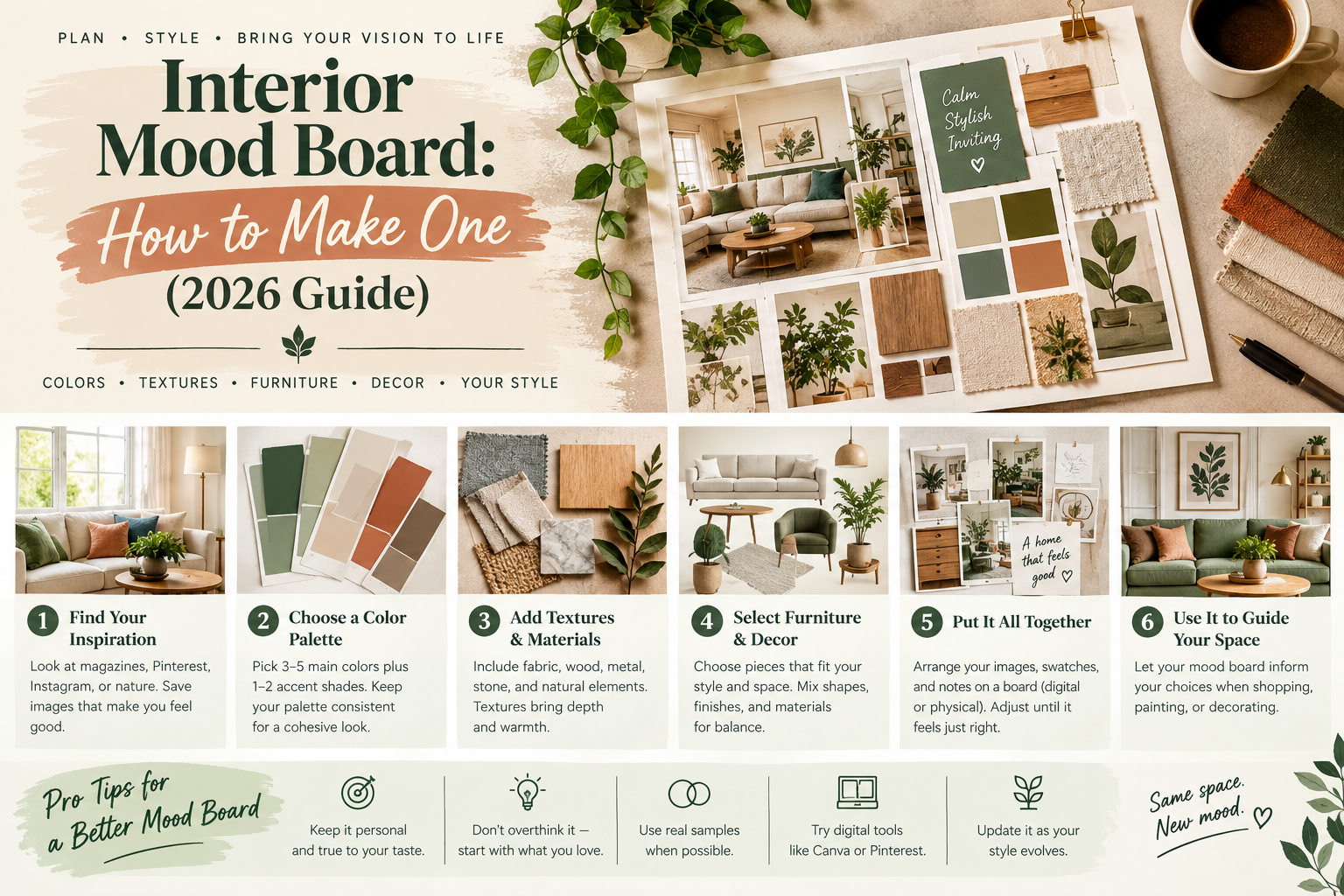
An interior mood board helps you turn scattered decorating ideas into a clear design direction before spending money on furniture, paint, or accessories. Whether you're renovating a living room, decorating a bedroom, or planning a new kitchen, a mood board makes it easier to see how your favorite colors, textures, furniture, and materials work together.
You don't need professional design software or previous experience to make one. A simple Pinterest collection, a Canva collage, or a physical board with fabric and paint samples can help you organize your ideas.
The most useful mood boards do more than look attractive. They help you identify what you love, communicate your ideas, and make decisions that suit your actual room and budget.
Quick answer: To create an interior mood board, choose a room and design goal, collect inspiration images, select a color palette, add furniture and material references, arrange everything into a visual collage, and refine it until the elements feel cohesive. You can make a digital mood board using Canva, Pinterest, or Milanote, or create a physical board with printed pictures and material samples.
This guide explains the different types of interior mood boards, eight practical steps to create your own, the best tools to use, and examples for bedrooms, living rooms, and kitchens.
What Is an Interior Mood Board?
An interior mood board is a visual collection of colors, materials, furnishings, photographs, and design references that communicates the intended look and feel of a room.
Interior designers use mood boards to establish a shared vision before making detailed selections.
For homeowners, a mood board can help answer questions such as:
Which decorating style do I actually prefer?
Do these furniture pieces work together?
What colors should I use for the walls and accessories?
Should I choose light or dark wood?
Which fabrics and textures complement the room?
What atmosphere do I want the space to create?
A mood board does not have to show exact products.
It can represent a broader concept, such as "warm minimalist living room" or "cozy traditional bedroom."
Later, the concept can be developed into a more specific selection of furniture and materials.
Why Is a Mood Board Important in Interior Design?
A mood board helps establish consistency throughout the design process.
Without one, it's easy to collect attractive products that don't work well together.
For example, you may like a contemporary sofa, a rustic coffee table, a colorful rug, and traditional wallpaper individually. A mood board allows you to compare them before committing to purchases.
Benefits of Creating an Interior Mood Board
Clarifies your style: You can identify repeating colors, shapes, and materials in your favorite inspiration images.
Reduces impulsive decisions: A visual design direction helps you assess whether a new purchase fits the room.
Supports budget planning: You can identify essential pieces before spending on accessories.
Improves communication: A board can help family members, decorators, or contractors understand your intended aesthetic.
Makes experimentation easier: You can compare multiple design directions without repainting walls or moving heavy furniture.
Connects ideas to reality: A product-focused board can include actual items, dimensions, and purchasing information.
What Should an Interior Design Mood Board Include?
A useful mood board should represent the major visual elements of the intended space.
| Element | What to Include | Why It Matters |
|---|---|---|
| Inspiration photographs | Rooms with your preferred style | Establishes overall direction |
| Color palette | Main, secondary, and accent colors | Creates cohesion |
| Furniture | Sofa, bed, dining table, or major pieces | Defines visual style |
| Materials | Wood, stone, metal, or tile | Establishes finishes |
| Textures | Linen, velvet, wool, rattan, leather | Adds depth |
| Flooring | Timber, carpet, tile, or rugs | Connects the scheme |
| Lighting | Pendant, floor, wall, and table lights | Shapes atmosphere |
| Window treatments | Curtains, blinds, or shutters | Influences color and softness |
| Artwork | Prints, photographs, or other art | Adds character |
| Notes | Budget, measurements, and priorities | Keeps the design practical |
You don't have to include every element on the first version.
Start with the most important decisions and add detail as the concept develops.
How to Create an Interior Mood Board in 8 Steps
Step 1: Define Your Room and Design Goal
Before collecting photographs, decide what you want to achieve.
For example, your goal might be to make a small bedroom feel calm and organized, or to create a more welcoming living room with better seating.
Write down the room's main requirements.
Consider how the space is used, who uses it, and which existing items need to stay.
A clear goal prevents your inspiration collection from drifting into styles that look appealing but don't suit your home.
Example design brief:
Room: Small living room
Desired style: Warm contemporary
Main colors: Cream, olive green, and walnut
Furniture to keep: Beige sofa
Budget: $1,500
Priority: Better lighting and a more cohesive furniture arrangement
This simple brief provides a foundation for your mood board.
Step 2: Collect Interior Design Inspiration
Look for photographs that communicate the mood you want.
Pinterest, design magazines, furniture retailers, architecture websites, and interior design portfolios can all provide inspiration.
Rather than collecting only complete room photographs, save individual materials and products as well.
For example, your collection might include a living room with appealing lighting, a rug with a favorite pattern, and a wooden table with the right finish.
How Many Images Should You Collect?
Begin with approximately 15–25 references if you're exploring several ideas.
Then narrow them down to a smaller selection of the most relevant images.
For a final one-page board, around 8–15 carefully chosen visual elements is often easier to understand than a crowded collage.
These are workflow suggestions, not rigid professional rules.
Step 3: Identify Your Interior Design Style
Review the inspiration you've collected.
Look for repeating features.
Do you prefer light wood or dark wood? Warm neutral colors or dramatic contrast? Rounded furniture or straight lines?
These patterns can help you identify a direction.
| Interior Style | Typical Mood Board Elements |
|---|---|
| Modern | Clean lines, simple furniture, minimal details |
| Scandinavian | Light wood, soft textiles, pale neutrals |
| Japandi | Natural materials, muted tones, restrained shapes |
| Traditional | Classic furniture, detailed finishes, rich textures |
| Bohemian | Patterned textiles, layered colors, organic materials |
| Contemporary | Current forms, balanced contrast, mixed finishes |
| Rustic | Visible wood grain, earthy colors, tactile textures |
| Coastal | Airy neutrals, blue accents, woven materials |
You can combine elements from different styles, provided the final design has a consistent visual direction.
Step 4: Build Your Color Palette
Choose a small collection of colors that work with the furniture and finishes you plan to keep.
A useful starting point is one dominant color, one or two supporting colors, and one accent.
For example, a warm contemporary living room might use:
Warm white for the walls
Beige for the sofa
Walnut brown for furniture
Olive green for cushions or artwork
Muted brass for selected hardware
Add digital color swatches to the board.
If you use HEX color codes, treat them as digital references rather than exact paint specifications.
Actual paint and fabric colors can look different because of screen settings, surface textures, and lighting.
Step 5: Add Furniture, Materials, and Textures
Now move beyond room inspiration photographs.
Add images of the furniture you own and items you're considering buying.
Include flooring, cabinet finishes, rugs, upholstery, lighting, and window treatments.
Try to collect clean product images that show each item clearly.
For example, a plain-background image of a chair can be easier to compare with other products than a photograph of an entire furnished room.
Include wood and fabric close-ups so you can see how materials relate.
If you are planning a kitchen or bathroom, pay particular attention to cabinet finishes, tile, stone, and hardware.
Step 6: Choose a Mood Board Tool
There are several ways to create an interior design mood board.
Choose the tool that suits your technical skills and how you plan to use the final board.
| Tool | Best For | Main Advantage |
|---|---|---|
| Gathering ideas quickly | Easy image collection and organization | |
| Canva | Attractive one-page collages | Templates and simple visual editing |
| Milanote | Detailed, flexible project boards | Notes, links, images, and collaboration |
| Adobe Illustrator | Precise custom compositions | Advanced arrangement and typography |
| Google Slides | Simple presentations and sharing | Familiar slide-based editing |
| Physical board | Real materials and finishes | Evaluating actual texture and color |
Tool features, free-plan limits, and pricing can change.
For beginners who want a finished collage, Canva is a practical starting point. For collecting inspiration, Pinterest is particularly convenient.
Step 7: Arrange and Refine the Mood Board
Once your images are collected, arrange them into a coherent composition.
Start with your main inspiration photograph or the largest furniture piece.
Place supporting materials nearby.
Group related colors and textures together.
Vary image sizes to establish visual hierarchy.
A large sofa image may deserve more space than a small hardware sample because it has a greater influence on the room.
How to Know if Your Mood Board Works
Step back and look at the whole board.
Ask yourself:
Does the palette feel consistent?
Do the materials complement one another?
Is one design style dominating, or are too many styles competing?
Have I included the furniture I already own?
Does the overall appearance match the intended mood?
Remove images that no longer support the direction.
A good mood board is an edited collection, not simply everything you liked online.
Step 8: Turn the Mood Board Into a Design Plan
This final stage is what makes a mood board genuinely useful.
Create a separate list of the products and materials shown on the board.
For each purchase, record the estimated price, dimensions, finish, and source.
Next, compare the furniture dimensions with the actual room.
A sofa may look beautiful on your mood board but still be too large for the available floor space.
You may also need physical paint, fabric, and material samples to verify how colors work in your home's lighting.
Use the mood board as a design reference while developing the floor plan and shopping list.
How to Make an Interior Mood Board in Canva
Canva is a convenient choice for creating a digital collage.
You can begin from a blank design or explore available mood board templates.
Step-by-Step Canva Tutorial
Open Canva and search for a suitable mood board template.
Choose a layout or begin with a blank page.
Upload your inspiration photographs and product images.
Place the main reference image prominently.
Add color swatches, furniture images, and textures.
Resize and arrange the elements so the composition feels balanced.
Add short labels for important materials or design decisions.
Export the finished board as a suitable image or PDF.
Canva may provide background removal and additional editing capabilities depending on the current plan and tools available.
Use a clean layout with enough space between elements.
The goal is to communicate a room concept clearly, not to fill every part of the page.
How to Make an Interior Mood Board on Pinterest
Pinterest is especially useful during the early research stage.
It makes collecting and organizing visual inspiration straightforward.
Step-by-Step Pinterest Tutorial
Create a board for your room, such as "Warm Neutral Bedroom" or "Modern Green Kitchen."
Search for furniture, colors, interiors, and materials.
Save references that fit the design direction.
Organize the board into sections if that helps distinguish flooring, lighting, furniture, and color ideas.
After collecting enough images, review the entire board and remove references that conflict with the final direction.
Is Pinterest Enough for a Mood Board?
For informal personal planning, it may be sufficient.
However, a Pinterest board with hundreds of unrelated images can be difficult to use as a final decision-making document.
Consider transferring your selected references into a smaller Canva, Milanote, or Google Slides presentation.
How to Create a Mood Board in Milanote
Milanote is designed for organizing visual references, written notes, and creative projects.
It can be useful when the mood board needs to include product links, project requirements, and feedback from other people.
Basic Milanote Process
Start a new board and give it a name.
Add your room brief and project goals.
Upload reference images or save inspiration links.
Create color swatches and notes for important materials.
Arrange the images into a logical visual structure.
Add product sources and brief explanations.
Share the board with relevant collaborators when necessary.
Unlike a simple static collage, a digital workspace can remain flexible as the project develops.
How to Make a Physical Interior Design Mood Board
A physical mood board can be especially helpful when choosing finishes.
Digital images cannot accurately reproduce every paint undertone, material texture, or surface sheen.
Supplies You'll Need
Prepare a foam board, cork board, or another suitable presentation surface.
Collect printed inspiration images, fabric samples, paint cards, flooring samples, and small finish references.
Use removable tape, clips, or pins to arrange the materials.
Physical Mood Board Steps
Begin by placing your main inspiration image on the board.
Add a paint sample beside it.
Then arrange fabric, flooring, wood, and finish samples nearby.
Check whether the material combinations look consistent.
Move the board between different lighting conditions if possible.
Remember that material samples still need to be viewed in the actual room before major purchases.
A physical mood board is particularly useful for kitchen cabinetry, upholstery, flooring, and bathroom materials.
Interior Mood Board Examples for Different Rooms
Each room requires a slightly different approach because the furniture, lighting, and materials serve different purposes.
Living Room Interior Mood Board
A living room board should begin with the major seating and flooring elements.
Include a sofa, accent chair, coffee table, rug, wall color, and lighting references.
For example, a warm modern living room might feature a cream sofa, oak coffee table, olive green accents, and textured ivory fabric.
Make sure the design considers circulation and everyday use, not just appearance.
Bedroom Mood Board
A bedroom board should communicate comfort and relaxation.
Include a bed or headboard, bedding, curtains, lighting, and the main furniture finishes.
A calming bedroom concept might combine warm beige walls, muted blue bedding, natural wood, and soft lighting.
Check whether the proposed colors work with your existing flooring.
Kitchen Interior Mood Board
A kitchen board should include cabinetry, countertop material, backsplash, flooring, hardware, and lighting.
For example, a dark green kitchen mood board may combine forest green cabinets with white quartz, natural oak, and satin brass hardware.
Use real material samples to check undertones and textures.
Remember that a beautiful kitchen mood board does not replace technical kitchen planning.
Small Apartment Mood Board
In a small apartment, prioritize space-efficient furniture and visual continuity.
Use fewer major materials and a cohesive color palette.
Include compact furniture, flexible storage, and appropriate lighting.
The board should help you avoid buying attractive pieces that compete for limited floor space.
Interior Mood Board vs. Concept Board vs. Material Board
These terms are related but not identical.
| Board Type | Main Purpose | Typical Contents |
|---|---|---|
| Mood board | Communicate style and atmosphere | Inspiration images, colors, textures |
| Concept board | Explain the broader design direction | Themes, sketches, images, explanatory notes |
| Material board | Compare actual or proposed finishes | Fabric, wood, tile, stone, paint |
| Product selection board | Show specific proposed purchases | Furniture, fixtures, product references |
In practice, designers may combine these formats.
A single board can include mood references, real products, and selected materials.
However, separating them can make complex projects easier to review.
How to Turn a Mood Board Into a Real Room
One of the most common mistakes is treating the mood board as the final design.
A collage can show beautiful furniture without demonstrating whether the pieces fit together physically.
Check Furniture Dimensions
Measure the available space before ordering furniture.
Compare product dimensions with the room layout.
Allow appropriate access to doors, storage, and walkways.
Test Paint and Fabrics
Use physical samples to verify color and texture.
Observe paint samples during daylight and under artificial lighting.
Build a Shopping List
Separate purchases into categories such as essential furniture, lighting, textiles, and accessories.
Add quantities, prices, delivery costs, and measurements.
Prioritize the Budget
Spend first on items that improve the room's function and comfort.
Decorative pieces can often be purchased later.
Review the Entire Design
Compare the proposed purchases with your original mood board.
If a product no longer fits the concept, consider an alternative.
A mood board should guide decisions while remaining flexible enough to accommodate practical needs.
Common Interior Mood Board Mistakes
Collecting Too Many Images
Hundreds of inspiration pictures can make it difficult to identify a consistent direction.
Edit your collection before creating the final board.
Forgetting Existing Furniture
If you plan to keep your current sofa, bed, or dining table, include it.
This helps prevent purchasing items that clash with major furniture you already own.
Ignoring Materials
A mood board composed only of styled room photographs may not show how the actual finishes work together.
Include wood, fabric, paint, and flooring references.
Choosing Colors Only From Screens
Digital swatches may not match physical paint or fabric.
Use real samples for final decisions.
Forgetting Function and Measurements
Aesthetic inspiration is only one part of successful interior design.
Confirm that your furniture and layout suit the room.
Copying One Room Exactly
An inspiration photograph may show architecture, lighting, or proportions that differ from your home.
Adapt the design principles rather than trying to duplicate every detail.
Making the Board Too Perfect Too Early
Mood boards are exploration tools.
Allow yourself to change the composition and replace ideas that don't work.
Interior Mood Board Checklist
Before finalizing your board, check that you've included the essential information.
Room purpose and design goal
Main inspiration image
Preferred decorating style
Primary and accent colors
Existing furniture to keep
Proposed main furniture
Flooring and rug references
Fabric and material textures
Lighting ideas
Window treatment options
Key product sources
Estimated budget
Relevant room measurements
Final color and material samples to test
You can use this checklist for bedrooms, living rooms, kitchens, home offices, and other interior projects.
Frequently Asked Questions About Interior Mood Boards
What Is an Interior Mood Board?
An interior mood board is a visual collection of room inspiration, colors, textures, furniture, and materials. It communicates the intended style and atmosphere of an interior design project.
How Do You Create an Interior Design Mood Board?
Define your project goal, collect inspiration, choose a color palette, add furniture and material references, and arrange everything into a clear visual composition. Refine the board before making purchases.
What Should an Interior Mood Board Include?
Include inspiration photographs, color swatches, furniture, materials, textures, lighting, flooring, and relevant notes. A product-focused board may also include prices, dimensions, and links.
Can I Make an Interior Mood Board for Free?
Yes. You can use a Pinterest board, a basic Google Slides presentation, or free features available through selected mood board platforms. Specific features and usage limits vary.
Is Canva Good for Interior Mood Boards?
Canva can be useful for creating organized visual collages using templates, photographs, color swatches, and text labels. It's particularly suitable for beginners.
Is Pinterest a Mood Board?
A Pinterest board can serve as a digital inspiration board. However, a smaller edited collage may be easier to use when making final design decisions or presenting a cohesive concept.
How Many Images Should Be on an Interior Mood Board?
There is no fixed requirement. Around 8–15 carefully selected visual elements can be a useful starting point for a one-page concept, though more complex projects may need additional references.
What Is the Difference Between a Mood Board and a Material Board?
A mood board communicates the overall design atmosphere, while a material board focuses on actual finishes such as paint, fabric, wood, tile, and stone.
Do Interior Designers Use Mood Boards?
Yes. Mood boards are widely used to explore concepts and communicate design directions with clients or collaborators.
Can AI Help Create an Interior Mood Board?
AI tools can help explore styles, generate reference imagery, or organize ideas. However, generated images may contain unrealistic furniture details or materials, so actual products and measurements need verification.
How Do I Choose Colors for an Interior Mood Board?
Start with major existing elements such as flooring and furniture. Select a dominant color and supporting shades, then test physical samples in the room's actual lighting.
What Comes After an Interior Mood Board?
The next stage is usually practical design planning, including furniture layouts, material selection, budgeting, measurements, and purchasing decisions.
Conclusion
Creating an interior mood board is one of the simplest ways to turn decorating inspiration into a clear design direction.
Whether you use Canva, Pinterest, Milanote, Google Slides, or physical samples, the process begins with understanding how you want the room to look and function.
Collect inspiration, identify recurring colors and materials, arrange the most relevant elements, and refine the board until it communicates a cohesive concept.
Before buying furniture or committing to permanent finishes, compare the mood board with your actual room dimensions, budget, and lighting.
A successful mood board is not just a beautiful collage. It's a practical planning tool that helps you make more consistent and confident interior design decisions.
References and Further Reading
Last reviewed: October 17, 2026. Software capabilities, templates, pricing, and export options may change.