An app for furniture layout can help you discover where your sofa, bed, dining table, or desk should go before you move heavy furniture or spend money on something new.
Instead of guessing whether a sectional sofa will fit your living room, you can enter room measurements, add virtual furniture, and compare different arrangements. Some tools also let you upload a photo of your actual room and visualize new furniture in the space.
But not every furniture layout app works the same way. Some specialize in accurate floor plans, while others focus on realistic 3D interiors or products from a particular retailer.
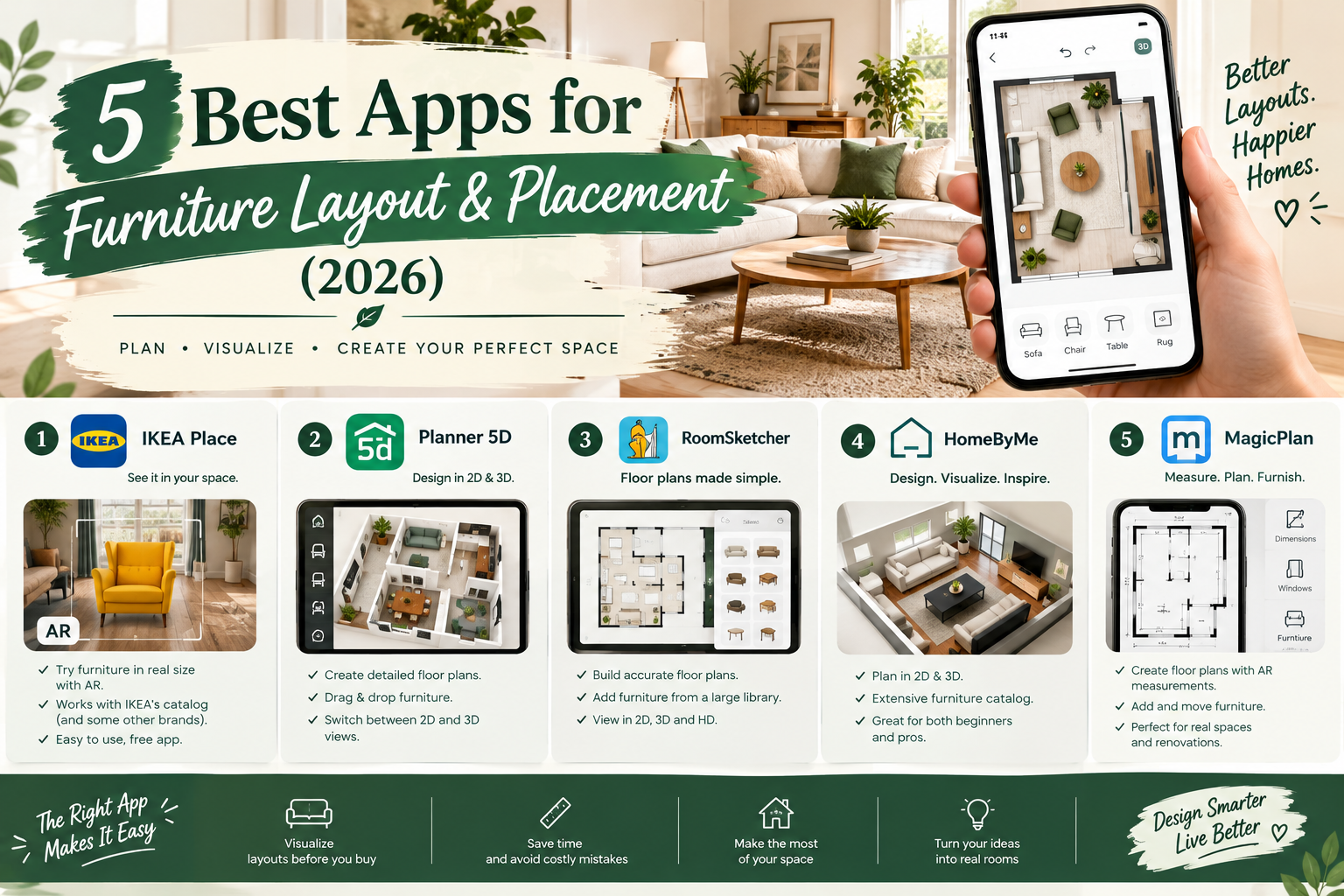
Quick answer: Floorplanner is a useful choice for arranging furniture in a measured room. Planner 5D is suitable for beginner-friendly 2D and 3D furniture planning. IKEA Kreativ helps visualize IKEA furniture in an existing room. Sweet Home 3D offers downloadable room-planning software, while RoomSketcher provides structured floor-plan and furniture-design tools.
In this guide, we'll compare five furniture layout apps, examine their free features, and explain how to arrange furniture virtually before buying or rearranging it.
What Is a Furniture Layout App?
A furniture layout app is a digital tool that lets you position and rearrange furniture within a virtual representation of a room.
Depending on the application, you can start with a blank floor plan, draw a room using its dimensions, upload a photograph, or choose a pre-designed space.
You can then experiment with the placement of sofas, chairs, tables, beds, storage units, and other furnishings.
The main benefit is being able to compare layouts without physically moving everything.
What Can You Do With a Furniture Arrangement App?
A suitable tool may help you:
Position furniture using drag-and-drop controls.
Measure the available floor space.
Rotate and move sofas, chairs and tables.
Compare alternative furniture arrangements.
Check access to doors and windows.
Preview a room in 2D or 3D.
Visualize furniture before purchasing it.
Save layouts for future reference.
Features vary by app and subscription.
For a buying decision, accurate furniture dimensions matter more than photorealistic decoration.
Best Furniture Layout Apps: Quick Comparison
| App | Best for | Free option | Main limitation |
|---|---|---|---|
| Floorplanner | Furniture placement in measured rooms | Yes | Watermarked, limited free exports |
| Planner 5D | Beginner-friendly 2D and 3D arranging | Yes | Partial furniture catalog |
| IKEA Kreativ | Previewing IKEA furniture in your room | Yes | IKEA-focused product selection |
| Sweet Home 3D | Downloadable furniture planning software | Yes | Interface takes practice |
| RoomSketcher | Structured room layouts and dimensions | Free starter plan | Certain floor-plan outputs require payment |
No single application is ideal for every project. Choose based on whether you need measurements, realistic visuals, or retailer-specific furniture.
1. Floorplanner — Best for Measuring Furniture Placement
Official website: https://floorplanner.com/
Floorplanner allows you to draw rooms, specify dimensions, and position virtual furniture within the available space.
This makes it useful when you're comparing furniture sizes or deciding how to arrange an awkward room.
Why It's Useful
Suppose you have an 11-by-14-foot living room and want to compare two furniture arrangements.
One option includes a large sectional sofa.
The second includes a smaller sofa and two accent chairs.
Floorplanner lets you represent the room and compare how each arrangement affects the walking routes and available space.
You can also include doors and windows to assess where furniture should be placed.
Free Plan
Floorplanner currently allows up to five free projects.
Its free projects have restrictions on design variants and export quality. Standard-definition exports include a watermark.
Higher-resolution images and certain additional options require credits or upgrades.
Pros and Cons
The main advantage is combining measured layouts with 3D visualization.
The main drawback is that users must learn enough of the drawing interface to produce a useful floor plan.
Best for: People who care most about furniture fit and placement.
2. Planner 5D — Best for Beginners Who Want 3D Furniture Layouts
Official website: https://planner5d.com/
Planner 5D provides a visual interface for creating room plans and arranging furniture in 2D and 3D.
It is particularly useful if you want to compare furniture placement while also experimenting with colors and finishes.
Why It's Useful
You can create a bedroom layout, add a bed, rearrange bedside tables, and compare the position of a desk or dresser.
A 3D view can help you understand whether the room feels crowded or visually balanced.
For a living room, you can compare seating arrangements and see how the furniture looks from different perspectives.
Free Plan
Planner 5D's published free plan currently offers unlimited projects across supported web and mobile platforms.
It includes access to approximately half of the furniture catalog.
Additional furniture, advanced renders, AI tools, and professional features may require payment.
Pros and Cons
Its main advantage is the ability to explore room arrangements in both 2D and 3D without immediately purchasing a subscription.
Its limitation is that the free catalog and visual-output capabilities are restricted.
Best for: Beginners experimenting with furniture arrangements and interior styles.
3. IKEA Kreativ — Best for Visualizing Furniture in Your Actual Room
Official website: https://www.ikea.com/us/en/home-design/
IKEA Kreativ is particularly useful when you're planning to purchase IKEA furniture.
Rather than building every room from scratch, you can use a photograph or another supported room-design workflow.
Why It's Useful
Imagine that you want to replace an old armchair with a new IKEA chair.
You can upload a room photo, remove existing furnishings from the virtual design, and experiment with selected IKEA pieces.
You can also create a 3D room using measurements, and compatible LiDAR-enabled devices can support room scanning.
This makes IKEA Kreativ different from software focused primarily on architectural floor-plan drawing.
Free Features
IKEA describes Kreativ as a free virtual room designer.
It supports photo-based design, 3D room building and virtual showroom exploration, depending on the device and workflow.
Its product library is focused on IKEA furniture and accessories.
Pros and Cons
Its main advantage is helping connect room visualization with purchasable IKEA products.
The limitation is that it isn't a universal furniture catalog or a substitute for checking exact measurements.
Best for: People planning to buy or rearrange IKEA furniture.
4. Sweet Home 3D — Best Free Downloadable Furniture Planner
Official website: https://www.sweethome3d.com/
Sweet Home 3D is an open-source interior design program that supports floor-plan drawing and furniture arrangement.
It offers a different workflow from retailer-specific visualization apps.
Why It's Useful
You can draw a room to scale, position furniture, and explore the arrangement in 3D.
For a home office, this could involve arranging a desk, chair, bookcase, and storage cabinet while checking door access.
For a small apartment, you can experiment with several pieces in one coordinated floor plan.
Free Access
The official Sweet Home 3D project provides free open-source software.
Certain distribution channels or optional assets may have separate terms.
Pros and Cons
A major advantage is access to a capable floor-planning application without needing a paid subscription for the core software.
Its disadvantage is that the interface may feel less immediately approachable than a simple visual shopping tool.
Best for: Users who prefer downloadable planning software and detailed layouts.
5. RoomSketcher — Best for Structured Furniture Floor Plans
Official website: https://www.roomsketcher.com/
RoomSketcher allows users to build room layouts and arrange furniture using floor-planning tools.
It is useful when you want to communicate the position of furniture clearly, rather than simply generate an attractive interior image.
Why It's Useful
You can represent the main room boundaries, add doors and windows, and position furniture to compare layouts.
It can be particularly useful when planning a room for multiple people or discussing furnishing options with a decorator.
Free Access
RoomSketcher offers a free starter subscription for creating floor plans and exploring interior design.
Some finished floor-plan outputs and advanced features require credits or paid access.
Review its current pricing before choosing it for downloadable presentations.
Pros and Cons
Its strengths are structured room planning and visual communication.
Its limitation is that the free plan does not necessarily include every export or presentation feature.
Best for: Users wanting an organized furniture layout and potentially more formal floor-plan outputs.
Which Furniture Layout App Should You Choose?
Choose the tool that matches the actual decision you need to make.
If you're trying to see whether a large sofa fits, start with Floorplanner.
If you want to compare visual arrangements in a bedroom, Planner 5D is a convenient option.
If you're buying IKEA furniture, try IKEA Kreativ.
If you prefer open-source downloadable software, explore Sweet Home 3D.
If you need structured floor-plan presentations, consider RoomSketcher.
You don't need to test every app to arrange one small room successfully.
How to Arrange Furniture in a Room Virtually
Follow this process regardless of your chosen software.
Step 1: Measure the Room
Measure the room's length and width.
Record the location and dimensions of doors, windows, fixed cabinetry, and other architectural features.
For irregular rooms, note recesses and projections separately.
Accurate measurements make the virtual layout more useful.
Step 2: Measure Your Furniture
Write down the actual width, depth and height of major pieces.
For a sofa, include any protruding chaise section.
For a dining table, account for chairs and the space required to pull them out.
For a wardrobe, account for door or drawer opening space.
Step 3: Create a Virtual Floor Plan
Open the furniture layout app and enter your room dimensions.
Add doors and windows in their correct positions.
Check that the software is using the right measurement units.
Step 4: Position the Largest Furniture First
In a living room, begin with the main sofa.
In a bedroom, begin with the bed.
In a home office, begin with the desk.
These pieces have the biggest influence on the remaining usable space.
Step 5: Add Secondary Furniture
Insert side tables, chairs, dressers, cabinets, or shelving.
Rotate or reposition them until the layout supports the room's purpose.
Don't fill every available corner.
Step 6: Check Walking Clearances
Review the paths between furniture, doors, and other important areas.
For general residential planning, leaving approximately 30–36 inches for main circulation is a useful starting point when space permits.
This is not a substitute for applicable building or accessibility requirements.
Step 7: Create Alternate Layouts
Try at least two furniture arrangements.
For example, compare a large sectional against a smaller sofa with separate chairs.
You may discover that smaller pieces offer better flexibility even when their combined seating capacity is similar.
Step 8: Preview in 3D
Switch to 3D when the application supports it.
Assess proportions, visibility, and how the furniture relates to windows and walls.
Remember that a virtual rendering is only as accurate as the measurements and models used.
Step 9: Save and Compare
Save the arrangements using the available software features.
Compare their practical benefits rather than choosing solely on appearance.
Step 10: Verify Before Purchasing
Check product specifications, delivery access, furniture dimensions, and available floor space one final time.
Do not rely exclusively on a virtual model for expensive furniture purchases.
Furniture Layout Tips for Different Rooms
Living Room Furniture Layout
Start with the main seating arrangement.
Consider the television, fireplace, windows, and the way people enter the room.
In a conversation-oriented living room, chairs may face the sofa instead of all furniture pointing toward the television.
Keep pathways clear and avoid placing tables where they obstruct movement.
Bedroom Furniture Layout
Begin with the bed and its access requirements.
Then consider wardrobes, dressers, bedside tables, and desks.
In a small bedroom, prioritize ease of movement rather than maximizing the number of pieces.
Small Apartment Layout
Use furniture dimensions carefully.
Choose multifunctional pieces when appropriate.
A compact desk, narrow shelving unit, or storage bed may provide more value than large decorative furnishings.
The app can help test which options use space efficiently.
Home Office Furniture Layout
Position the desk to balance light, glare, working comfort, and access to power.
Allow sufficient chair movement.
Place storage where it can be reached without obstructing the main circulation path.
Dining Room Furniture Layout
Don't consider the table alone.
Include chairs in the virtual design and allow room to pull them out.
Check whether people can move behind occupied chairs.
A smaller table may support more comfortable everyday use than a larger one that barely fits.
Can You Use an App to Arrange Furniture From a Photo?
Yes, although not every furniture planner offers photo-based visualization.
IKEA Kreativ is one example.
It supports using a photograph of an existing room and experimenting with IKEA products in the scene.
However, photo-based visualization and dimension-accurate floor planning are different.
A realistic image can suggest how the furniture looks, but you should still verify product dimensions and clearances.
For tight spaces, a measured 2D layout is often more dependable than appearance alone.
Furniture Placement App vs. Room Layout Software
| Feature | Furniture placement app | General room layout software |
|---|---|---|
| Main purpose | Arrange furniture | Plan spaces and room geometry |
| Starting point | Photo, existing room or floor plan | Usually a measured floor plan |
| Product visualization | Often emphasized | Varies |
| Wall editing | Sometimes limited | Usually more developed |
| Furniture measurements | Depends on tool | Common feature |
| Best for | Furnishing and rearranging | Overall space planning |
Many modern products combine both categories.
The terminology matters less than whether the tool provides the specific functions you need.
Common Mistakes When Using a Furniture Layout App
Using approximate furniture dimensions: An inaccurate virtual sofa can create a misleading sense of space.
Ignoring door movement: A dresser may fit physically but block a door or drawer.
Adding too much furniture: A crowded room can feel uncomfortable even when every piece technically fits.
Forgetting delivery access: Large furniture must pass through entrances, stairways, and corridors.
Choosing appearance over function: A visually balanced room still needs comfortable everyday circulation.
Assuming all free features are permanent: Free plans, furniture libraries, and export policies can change.
Confusing AI visualization with accurate measurement: Generated room images may not preserve actual proportions.
Frequently Asked Questions
What Is the Best App for Furniture Layout?
Floorplanner is a useful choice for measured furniture arrangements, while Planner 5D provides accessible 2D and 3D planning. IKEA Kreativ is particularly useful for previewing IKEA products.
Is There a Free App to Arrange Furniture in a Room?
Yes. Floorplanner, Planner 5D, IKEA Kreativ, Sweet Home 3D, and RoomSketcher offer free access to certain furniture-planning capabilities.
Can I Arrange Furniture Virtually Before Buying It?
Yes. You can enter room and furniture dimensions or use supported photo-based tools to compare arrangements before purchasing.
Can I Upload a Photo of My Room and Add Furniture?
Yes. IKEA Kreativ supports photo-based room visualization using IKEA furniture. Other software may offer similar features through different plans.
Which App Is Best for a Living Room Layout?
Floorplanner is useful if you want to check actual dimensions. Planner 5D can help visualize different seating arrangements in 3D.
Can I Plan Bedroom Furniture for Free?
Yes. Several free room planners allow you to position beds, wardrobes, tables, and other furniture in a virtual bedroom.
What Measurements Do I Need?
Record room length and width, windows, doors, major fixed features, and the actual dimensions of the furniture you intend to use.
Do Furniture Layout Apps Work on Phones?
Some do. Planner 5D supports web and mobile platforms, while IKEA Kreativ is available through the IKEA app and website. Other tools have different device requirements.
Can AI Arrange My Furniture?
Some design services offer AI-assisted furnishing or room visualization. However, verify room and product measurements before using an AI-generated design as a purchasing plan.
Is 2D or 3D Better for Furniture Planning?
Start with 2D when accurate placement is the priority. Use 3D to understand the overall appearance and proportions of the arrangement.
Conclusion
An app for furniture layout can help you compare room arrangements, check furniture dimensions, and avoid costly purchasing mistakes.
Floorplanner is especially useful for measured layouts, Planner 5D makes virtual room design approachable, and IKEA Kreativ helps visualize IKEA products in existing spaces.
Sweet Home 3D and RoomSketcher offer additional options for people who want more structured floor planning.
Whichever tool you choose, measure your room carefully, enter the actual furniture dimensions, and compare more than one arrangement.
A successful furniture layout should make the room easier to use—not just more attractive on a screen.
Official Sources
Last reviewed: October 17, 2026. Software features and free-plan conditions may change. This is a provider-researched comparison, not an independent hands-on benchmark of all five applications.